how to make stuff
in your sleep
everything from the class you can copy, paste and steal. that's the point.
Steal (9 refs, attributes not pictures) · Seed (one sentence, argue it sharper) · Sheet (lock the character) · Shot (stills, then motion) · Stitch (cut on motion) · Sound (cut the video to the beat).
Generation is one step of six. Spend your effort accordingly.
The five attributes you're stealing · light direction, framing, color grade, texture & grain, silhouette · are all rendered on one character with the exact words to prompt each, on the look sheet. Start there if "save attributes, not pictures" doesn't click yet.
SUBJECT   who or what, specifically
ACTION    what is happening right now, one beat
FRAMING   lens + angle · "35mm, low angle, waist-up"
LIGHT     direction + hardness · "hard sun from camera left"
GRADE     film stock / contrast · "Kodak 2383, crushed blacks, halation"
NEGATIVE  what must not appear · "no text, no extra hands"
Lens and grade do the most work. Almost nobody writes them.
CAMERA    one move only · "slow push in" / "handheld follow" / "locked off"
SUBJECT   one action inside 5 seconds, not three
HOLD      what must NOT move or change · naming it stops the melt
Dead clips are not a model problem. Nobody told the camera where to go.
character sheet of [CHARACTER], four panels: front view, three-quarter
view, profile view, full body. one identical soft lighting setup across
all panels. flat neutral grey background. no scene, no props, no text.
- Grey background, not white. Tested repeatedly: grey sheets hold identity better across shots. Higgsfield's own Seedance 4K breakdown uses grey for every sheet.
- Props are characters too. Anything the camera cares about gets its own 3-view sheet (front, side, back) on the same grey.
- The red arrow trick. If the character must touch one specific thing, draw a red arrow pointing at it on the reference sheet. The video model reads the arrow as intent:
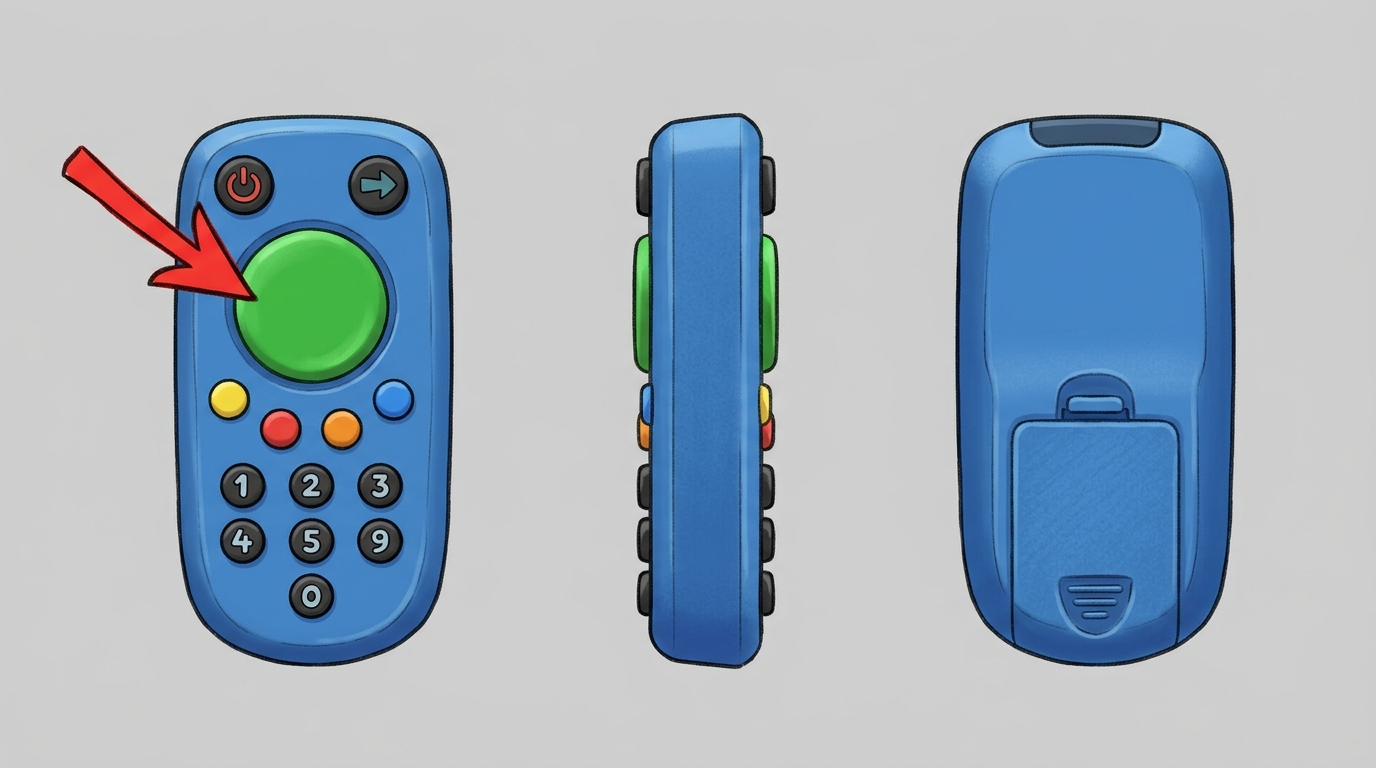
a prop sheet from this kit: three views, grey background, red arrow on the button the character has to press
- Context is king. Never let the model invent text, logos or key objects. It will hallucinate. Make the asset yourself, name it, and reference it in every prompt that uses it.
- Consistency comes from reference images, not adjectives. You cannot describe your way to the same face twice.
# who i am
[two sentences: what you make, who it's for]

# taste rules            ← grows every time you correct it. never shrinks.
- [thing you always want] because [why]
- [thing you never want] because [why]

# what done looks like
- [your usual job] is done when [checkable finish line]

# freeze log
when i correct you, restate the correction as a one-line rule
and remind me to save it here.
The loop: Feed it context · Frame the finish line · Fire and stop babysitting · Fix once, with the reason · Freeze the fix so it never happens again. Freeze is the whole game.
Then put it on a schedule. A routine is a rule with an alarm clock: once a job runs the same way twice, ask your agent to run it weekly and report back (Claude: scheduled tasks / Code: crons; GPT: Tasks). The graduation move is a Friday self-review: "look at what you produced this week, what performed, and update your own rules." That's the freeze log writing itself.
every [morning / friday]: check github trending (AI, agents,
video) and product hunt AI launches.

filter everything through my goals: [your goals here]

report a MAX of 5 finds. one line each: what it is + why it fits
what i'm building. skip anything generic.

if a find would improve how you work for me · a better tool,
a faster pipeline, a smarter workflow · say so and propose the
change to your own setup.
Run it manually with your coffee, or schedule it and never skip a day. The last paragraph is the one that compounds: the agent starts upgrading itself.
- "Interview me before you start." A bad brief becomes a good one, free.
- "What did you assume?" Catches the wrong turn early.
- "Critique your own output like you didn't write it, then fix it."
- "Give me three versions: safe, weird, wrong." The weird one is the idea.
- "Teach me the part I don't understand, then do it."
And the move that replaces the teacher:
here's how i work: [describe]. here's what i keep repeating to you:
[list]. what rules should i be saving so i never explain this again?
interview me first.
| tool | cost | |
|---|---|---|
| 1 · images + prompting | GPT · or the Claude / Gemini sub you already pay for. This one does double duty: stills AND the brain that writes your prompts. | $20/mo |
| 2 · video, standard | Gemini (Veo) or Grok Imagine · memes and dailies | $10–20/mo |
| 2 · video, medium | Kling · free tier gives ~66 credits/day (watermarked) to test tonight; the Freepik Premium bundle is repeatedly rated the best-value Kling access | $0–15/mo |
| 2 · video, pro | Seedance 2.0 · Higgsfield sub (~$34/mo ≈ 11–12 clips) or pay-per-clip on fal.ai (~$2–2.40 per 8s, no subscription, no UI) | ~$34/mo or ~$2/clip |
Hobbyist cheat code: aggregators like Pollo or Freepik put every model behind one credit balance · the cheapest way to try pro models before committing to any single sub.
prices checked jul 2026 (sources: higgsfield seedance pricing breakdown, atlascloud kling guide, fal.ai pricing) · they move fast, sanity-check before you subscribe
Same six steps at every tier. The tier only changes how pretty the pixels are.
- the look sheet · the five attributes rendered on one character, with the prompt words for each
- the faq · why agents, why many, the security checklist, finding connectors, and the lead scout funnel
- Higgsfield's Seedance 4K breakdown · the exact pro pipeline: Claude writes prompts, GPT Image 2 sheets + locations on grey, Seedance renders. Their @NAME asset-referencing trick is worth stealing.
- are.na · reference walls without an algorithm
- the class deck · arrows to move, S for the speaker notes
One freeze. Find the thing you explain to your AI every single time. Write it somewhere permanent. Post it in the channel next week.